Facebook, now Meta, is one of the most popular social media platform.
However, many users are often angry when it comes to protecting their privacy on Facebook.
Recently, Snapchat included safety features for the users, where it notifies them if someone takes a screenshot of their photos and videos.
So the question is, can someone see if you screenshot their Facebook story? Or in other words, does Facebook notify screenshots. In this article, I have explained it clearly.
Also read:
Does Facebook Notify Screenshots For Stories And Posts?
The screenshot is a very tempting feature and one can quickly save anything like photos, memes, text or posts. Facebook stories are temporary and lasts publicly for only 24 hours, unless added as a featured post.
So anyone can save them within that time period using screenshots. But can someone see if you screenshot their Facebook story?
It’s understandable. Not only is it difficult for Facebook to determine whether a screenshot is being taken in many scenarios, such as when Facebook is being used through an internet browser, but it’s also identical to how most other social media sites handle stories.
For example, taking screenshot of “stories” or other posts on Twitter, Instagram, and LinkedIn doesn’t notify the users who have made the post. (However, in specific circumstances, Instagram notifies users of screenshots).
Only Snapchat notifies the account owner when a screenshot of their stories is taken.
Notifications For Facebook Messenger
According to the latest news, Facebook has introduced screenshot notifications for the Facebook messenger users.
In an update shared in January, Facebook co-founder and chief executive officer Mark Zuckerberg stated that the Users will be notified if a screenshot of their message is taken, but only for end-to-end encrypted Messenger chats.
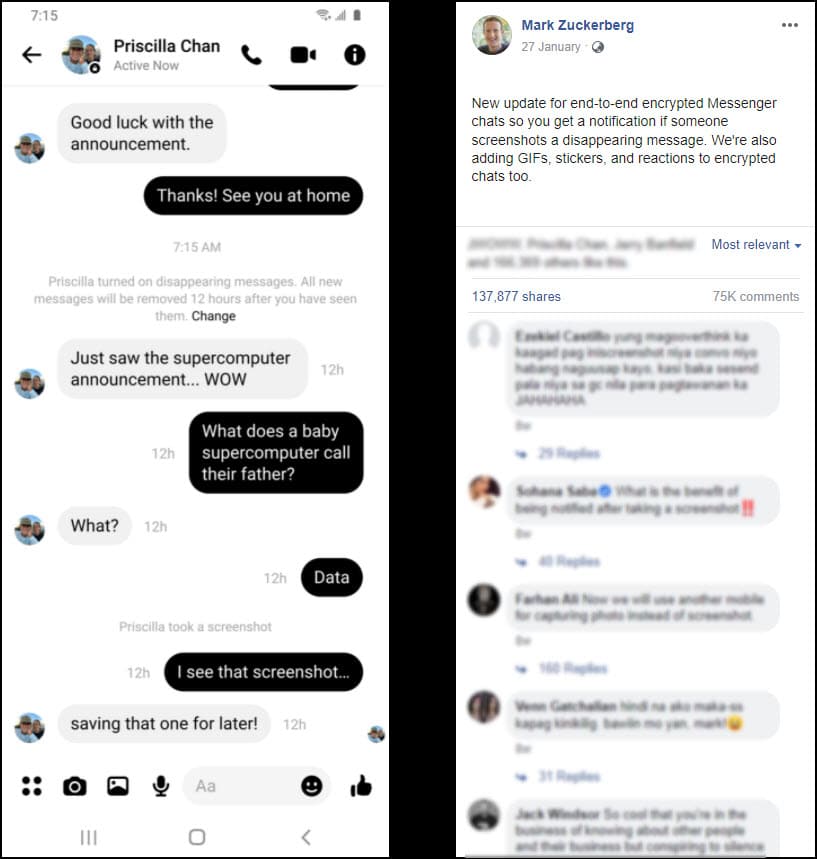
“We’re also adding GIFs, stickers, and reactions to encrypted chats,” Zuckerberg remarked in a talk with his wife, Priscilla Chan, demonstrating the new feature.
How Can I Protect My Pictures On Facebook?
So what precautions one can take to protect their content on Facebook?
Nobody wants their Facebook photos or posts to be mismanaged.
So, here are some tips on how to keep your profile safe —
1. Use Profile Picture Guard
You can safeguard your Facebook profile photo with a profile picture guard so that no one can copy or share it.
This function also prevents people from tagging your account.
If you haven’t utilized this functionality yet, follow these instructions:
Please note that this feature will not operate if your profile is locked.
To turn on this feature, please follow the steps –
- Open Facebook and go to your profile home page.
- Tap on your profile picture.
- Select Turn on profile picture guard.
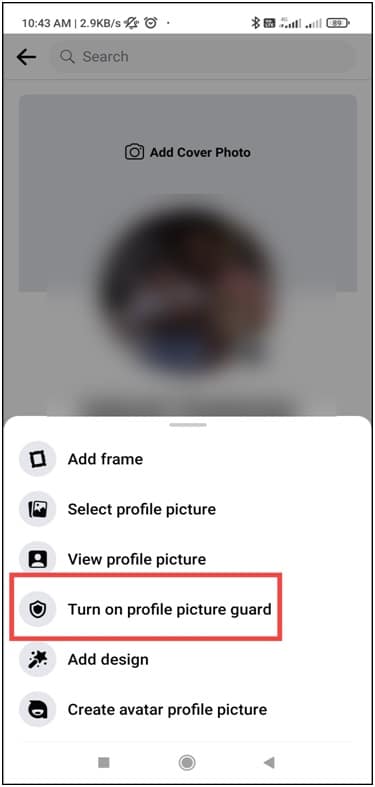
- Select Next from the following window to complete your action.
2. Lock Your Profile
Lock your profile if you don’t want anyone who isn’t a Facebook friend to see into your account.
To do that, follows the given steps –
- Open your Facebook account.
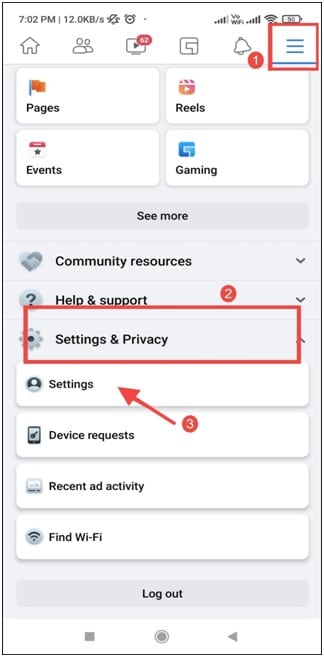
- Click on the Menu button (the three horizontal lines at the top right corner).
- Select Settings Option under Settings & privacy Option.
- Select the Profile Locking option from the Audience and Visibility area.
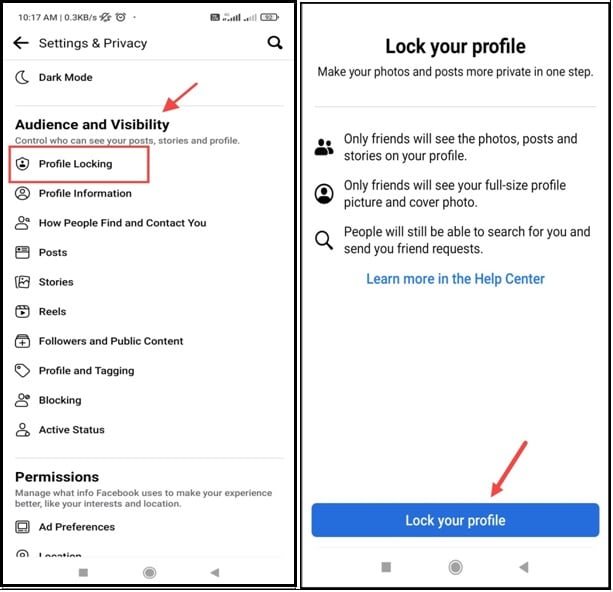
- Finally, click on lock your profile.
To apply the profile guard option, go to the next method.
3. Privacy Option
You may also protect your personal data on Facebook by changing your Facebook settings and using the privacy function.
Run the procedures for doing so –
- Go to the Audience and Visibility option as mentioned before on Solution 2.
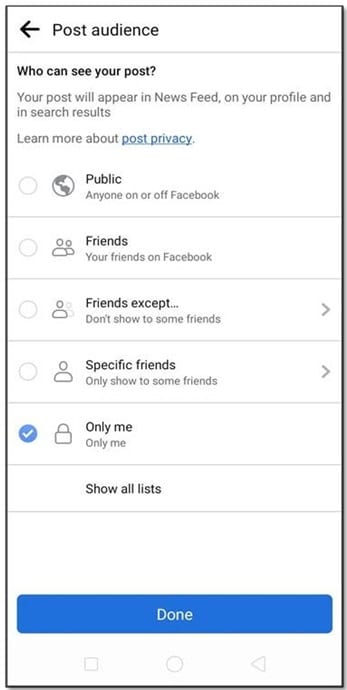
- Under this menu, there are Posts, Stories, Reels, and profile tagging options.
For every option, you can choose your preferred settings to protect your privacy by selecting public, friends, only me, etc.
Make it Public so that anybody can view it, or make it Friends so that only your friends can see it.
By selecting the Friends except… option, you can also exclude a few friends from viewing the post.
You have the option of selecting Specific friends or Only me if you want to keep things private.
Closing Up
So summing it up, can you see if someone screenshots your Facebook story?’ Or does Facebook notifies screenshots at all? No! Not for now at least. This feature can appear in the future, seeing how it has already appeared for the messenger.
If you have any other queries, ask us in the comment section below.

