Though the users are flooding to Instagram or other social platforms as Facebook they claim that has lost its fringe, yet you may love to continue with Facebook for some unconditional reasons.
Many of us cling to Facebook for birthday notifications of our friends and relatives that we might not remember in our day-to-day hectic schedule.
Today I am going to show you how to add Facebook birthdays to Google Calendar.
Also read: How To See Who Unfriended You On Facebook!
Why Add Facebook Birthdays To Google Calendar?
To date are over 2.5 million Facebook users and to now Facebook rocks as one of the most popular social media platforms.
It is a comfy zone till now to exchange and share thoughts, or simply expressing yourself, or just wishing you friends on their birthdays!
As I have mentioned before you can add Facebook birthdays to Google Calendar.
For this, you will need to get a Chrome Extension recommended to accomplish the job.
The default Calendar service of Google will do the smart job of tracking your friends’ special days.
The Process Of Adding Facebook Birthdays To Google Calendar
For adding Facebook birthdays to your Google Calendar, first of all, log in to your Facebook account with your credentials.
With just simple clicks you will be able to accomplish the task. Here, I am mentioning the process in detail. Trust me! The process is too easy to use.
Step 1: Next install Birthday Calendar Extractor For Facebook extension. You will get it from the Chrome webstore as I have linked.
Step 2: Now get back to your Facebook account and from the top left side choose the Birthday Calendar Extractor icon.
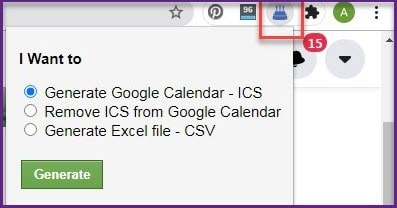
Step 3: Now click on the Generate Google Calendar – CSB or ICS and allow the file to get downloaded. It will take few seconds to download.
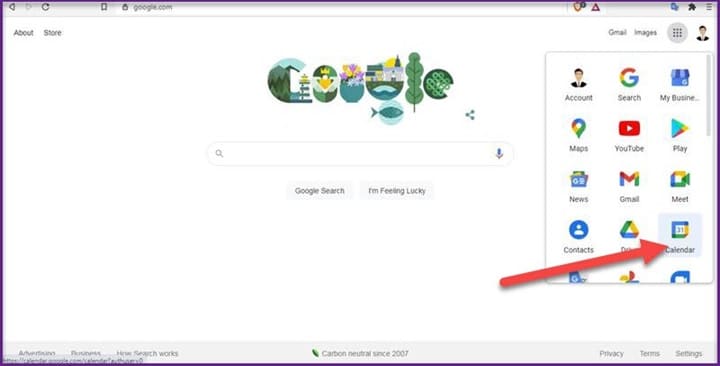
Step 4: Now move on to the Google Calendar page and hit the cogwheel icon.
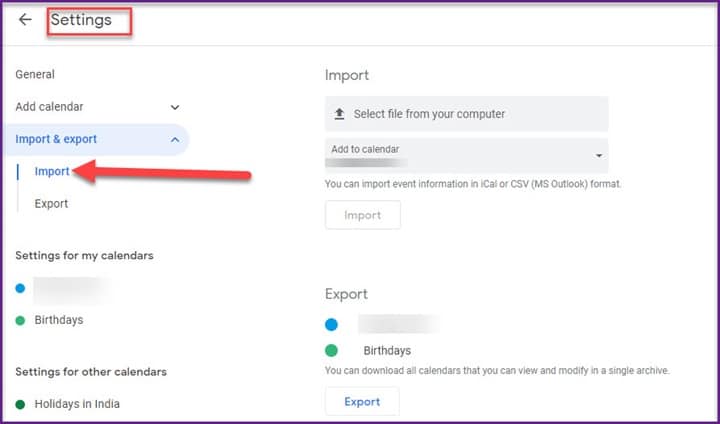
Step 5: Next go to Settings and expand the import and export option.
Now select the file from the location where you have downloaded it and hit the import option. Look at the picture given below.
Step 6: Wait for the transfer to get completed and you will get a pop-up notification to sync Facebook birthdays to Google calendar.
Step 7: So, you are done! Now, after finishing the entire process, you will be able to get the highlighted birthday notification on your Google Calendar app wizard.
This is how to sync Facebook birthdays with Google calendar with just a couple of clicks.
Closing Words
So, I hope by now, you could find out the process to add Facebook birthdays to Google calendar from the given article.
If you still have queries related to this issue, please communicate with us in the comments section provided below.
Feel free to shoot us a mail with your ideas or suggestions. We always look forward to hearing back from you.

