Robux, the virtual currency used in Roblox, enhances your gaming experience, but if your Robux is stuck in a pending status, then it becomes extremely frustrating.
Let us now dive into the world of pending Roblox transactions and uncover the mystery behind it.
What Is Pending Robux?
Pending Robux is an anti-abuse measure introduced by Roblox so that in case of any transaction problem, they can change it.
But changing entirely depends on the transaction amount. Note that this feature is exclusively designed to protect users from scams and other malicious activity on the platform.
It also prevents the scammer from earning from their operations, with Roblox being able to take back the pending Robux at any time.
What Is The Typical Time Frame For Pending Robux To Be Processed In Roblox?
Pending Robux usually takes 5 to 21 days to get processed and added to your account.
The shortest time is three days. The longest could be up to thirty days. So, Roblox can take up to thirty days to be available in your account.
This is how you can check it:
- Open Roblox from your web browser and click on this icon.
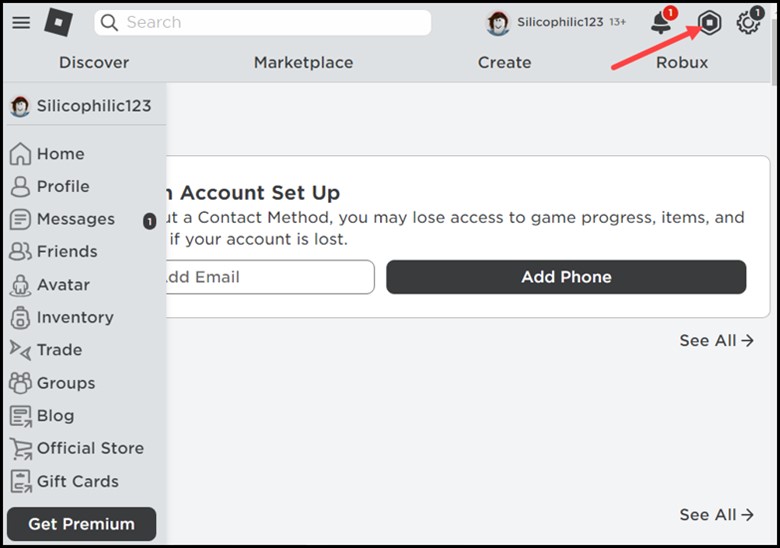
- Select My Transactions to check the details of your balance and transactions.
- Click on Incoming Robox. Here, at the bottom, you can see the pending Robux.
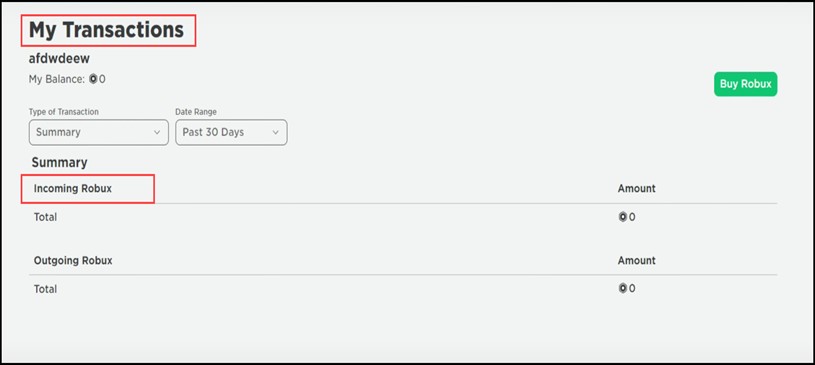
- Hover over the Pending Robux, and you will see a message that the Pending Robux is only included in your Total once released.
- All you need to do is wait till it gets added to your balance, and you can go and start spending it.
Factors That Affect The Processing Time For Pending Robux:
These are some additional factors that affect the processing time for pending Robux:
- Specific payment methods take longer to process
- The processing time for transactions from different countries varies
- In case of a high volume of transactions, it takes time for the pending Robux to get processed
Frequently Asked Questions (FAQs)
- What Are The Typical Processing Times For Pending Robux?
Here is a breakdown of the processing time for pending Robux:
- Small transactions of less than 981 Robux usually take 3-5 days.
- Medium transactions between 981-2000 Robux usually take 5-7 days
- Large transactions over 2000 Robux typically take 7-21 days
- What Should I Do If My Pending Robux Has Not Been Processed After 21 Days?
If you are waiting more than 21 days for the pending Robux, you need to contact Roblox customer support for further assistance.
- How Can I Prevent My Robux From Being Pending?
To prevent your Robux from being pending, it’s best to use a payment method that is fast and reliable.
Wrap Up
The time taken for pending Robux to get processed fluctuates depending on the transaction size and the volume of transactions that the Roblox payment processors are handling.
However, it is mandatory to contact Roblox customer support for further assistance if it is pending for more than 21 days.

