The CPU fan is one of the most important components of the computer. It helps to cool down the CPU and helps regulate the CPU temperature. The CPU changes the fan speed automatically, but it can also be done manually. You need a fan control software in order to change the fan speed manually.
There are various applications available in the market. But here some of the best and popular open-source software are discussed in order to help you to take a fair decision. After reading this article, your confusion will be cleared.
5 Best Fan Control Software For Windows 10
Keep on reading this article to compare among the most popular fan speed control software with distinctive features. By using these tools, you can manage and customize the CPU fan speed as your own.
1. SpeedFan
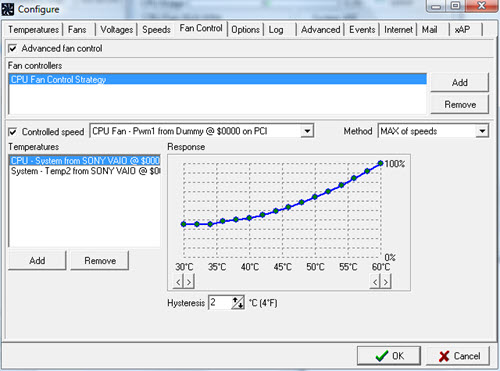
Although this software is very old, users prefer this one and that’s why this is at the top. This one is the most popular PC fan controller software due to its user-friendly interface and power. SpeedFan has various noticeable features, like:
- This software is compatible with all Windows versions. Using this, you can change the fan speed as well as monitor their voltage and temperature.
- You need to set the fan speed manually by hearing the noise coming from the fan. When you notice that the noise coming from the fan has decreased sufficiently, you can set the value as the minimum fan speed.
- When you set a warning temperature, the software will automatically change the fan speed when the temperature reaches the maximum level you set previously.
- This program can change the fan speed by accessing the digital temperature of the CPU besides reducing noise.
2. Notebook FanControl
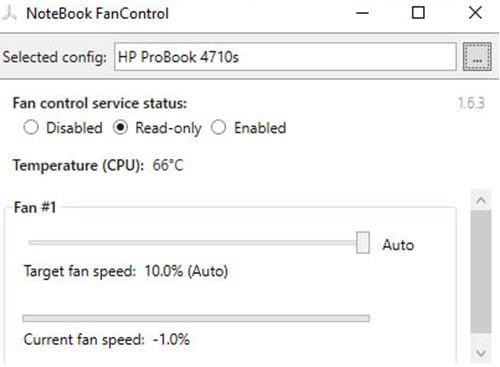
This software is designed to enable the user to control CPU fan speed efficiently. The user interface of this app is clean and simple to make everyone comfortable, even the beginners.
The most notable features are discussed below:
- You can choose predefined configurations according to your PC.
- The fan control service can be enabled or disabled according to your choice.
- You can change the fan’s speed by changing the simple slider located on the main menu.
- This CPU fan control application offers you real-time temperature and fan speed notification.
- You can set the program to launch automatically at the system startup if you need it.
- This fan control software is one of the most convenient system cooling programs. It is easy to use and compatible with Windows 7 and above operating systems.
3. Open Hardware Monitor
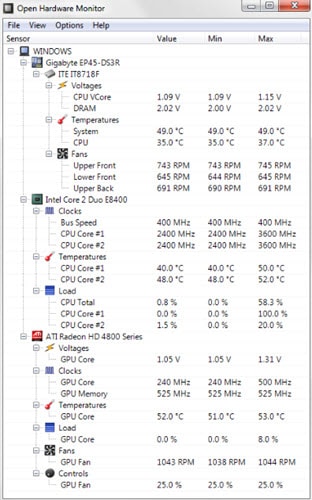
Another powerful CPU fan speed control software is Open Hardware Monitor. It is a free open source software. There are various tasks that can be performed by this program, such as controlling fan speed, managing temperature of CPU, checking voltages, etc.
There are some key features discussed below. You should read them carefully.
- This software supports the latest hardware monitoring chips.
- It examines the CPU temperature of Intel and AMD processors by reading the core temperature.
- This program displays the ATI and NVIDIA video cards temperature reading as well.
- It can run on both 32-bit and 64-bit computers.
- This software is compatible with Windows XP and above. You can also use this software on any x86 based Linux Operating System without having it installed.
- You can experience an organized and clean user interface while using this software.
Download Open Hardware Monitor.
4. Argus Monitor
Argus Monitor is an exceptionally light program. It continuously monitors the health of the CPU in the background and controls fan speed to minimize the temperature. There are some impressive features included in the Argus monitor software, which are listed below:
- By continuously checking the S.M.A.R.T attribute, Argus monitor enables you to monitor the CPU temperature as well as the CPU health.
- Argus monitor often informs the user prior 24 hours of the hard drive failure, so that the crucial data can be backed up and the accuracy of informing is up to 70%.
- There is a graphical display of GPU and CPU temperature present in Argus monitor.
- Argus monitor allows you to control the fan speed conveniently. You can either set the fan speed manually to a fixed value or with a curve that depends on available temperature sources.
- This application supports all Windows versions above Windows 7.
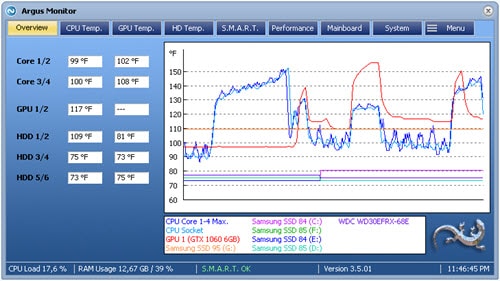
You can use Argus monitor free for 30 days. After the trial period is over, you need to buy the license key in order to use it further.
5. HWMonitor
HWMonitor is another popular program that has been around for a long time. Still, the popularity is increasing among the users which placed it in the top 5 list. Look at some best features of HWMonitor software below:
- This software keeps tracking the real-time speed of CPU fans.
- The HWMonitor is able to monitor one or more distant PCs with the help of TCP/IP connection.
- It monitors the system’s main sensors including the voltages, temperatures, fan speed, etc.
- HWMonitor tracks the minimum and maximum fan speed of CPU and cabinet and saves data in a plain text file.
- This application is compatible with all Windows 32-bit and 64-bit versions.
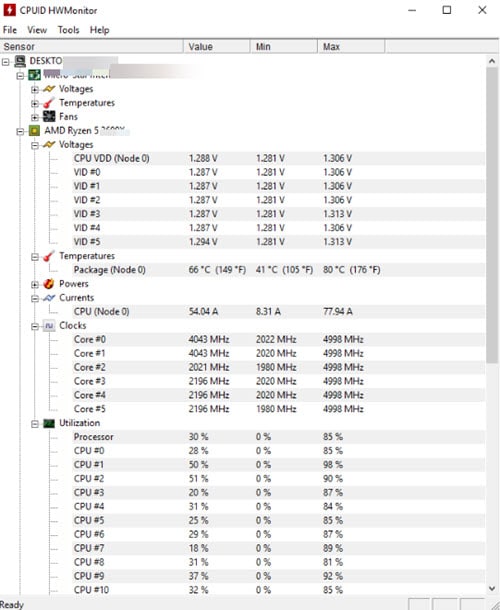
Although the user interface is not easy compared to other fan control software discussed above, you’ll get familiar with it in a while.
Conclusion
Now you have the best 5 fan control software according to the user reviews. If you need one of these listed applications, simply click on the download link provided at the end of each product. Which one do you prefer among these 5 options? Let us know by commenting below. If you still have queries regarding the PC fan controller software, feel free to ask us here.

