Included in your Microsoft account, would be the Microsoft Rewards app. In some of the recent Windows 10 updates, you may have even noticed Microsoft Rewards being positioned right on the start menu, although now it is hidden again for many users. But what is Microsoft Rewards program?
Here, I shall discuss the Microsoft Rewards app, and how do you get Microsoft points fast.
Microsoft Rewards App: What Is It?
Microsoft Rewards (previously Bing Rewards) is a free program introduced in 2018, which allows Windows 10 users to get rewards points based on their activity on the Microsoft products. Users can earn points when they use Bing to search on the internet, use Microsoft Edge to browse the internet, buy apps and games on the Microsoft Store, and use Windows 10 in their day to day life.
Microsoft Rewards Xbox and Microsoft Bing rewards (available in these regions) are collected in your account while you are signed in. If you stay signed in, you can keep earning these points for free. The more points you collect, the more chances you have of getting higher tiered rewards.
What Are The Rewards?
After accumulating the points, you can exchange these points for a variety of coupons and offers such as Xbox Game Passes, Skype unlimited world pass, gift cards, sweepstakes lottery, and much more. There are many goals that you can set, and earn points and track your points accordingly.
How To Enable Microsoft Bing Rewards?
To enable and take part in this program, you need to join it using the Microsoft Rewards site. If you haven’t already signed up for the service, here are the steps you need to follow:
- Open Microsoft Edge on your computer.
- Go to the Microsoft Accounts page.
- Create a Microsoft Account if you do not have one already. Else, sign into your account if you haven’t already signed into it.
- Now, visit the Microsoft Rewards website.
- Here, click on the Join for Free button at the bottom of the page.
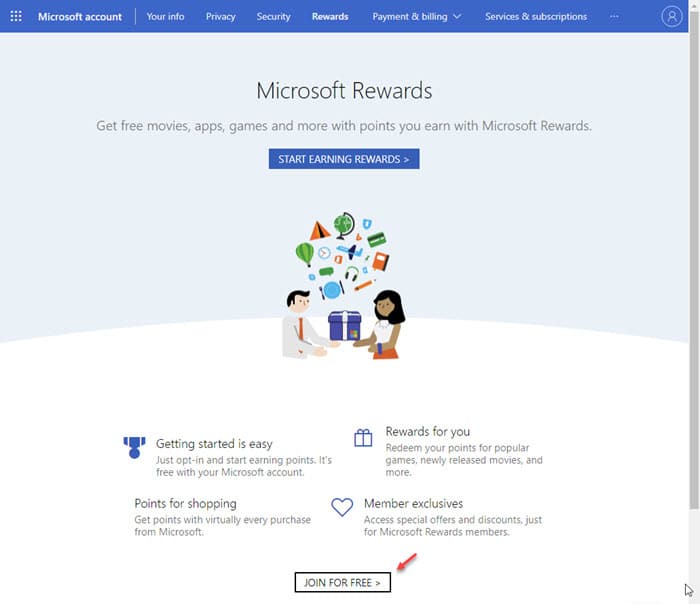
Now, you are enrolled into the Microsoft Rewards program, and you will be rewarded Reward points every time you use a Microsoft product or service.
How Do You Get Microsoft Points Fast?
After signing up to the service, how to get Rewards points faster? There are some simple tricks that you can use to maximize your chances of getting Reward points, which you can then exchange for rewards. Here are the tricks that you can follow:
Set Microsoft Edge As Your Default Browser.
To change the default applications, open Windows Search using Win + S shortcut. Type default apps, and click on the Settings app entry that shows up. Here, you can change the default browser to Microsoft Edge.
Use Bing As The Default Search Engine In Microsoft Edge.
To change the default search engine in Edge, open Microsoft Edge and click on the hamburger menu. Select Privacy and Services from the left menu tree, and scroll down to Services.
Click on Address bar, where you will find the following option to change the default search engine used in Edge:
Search engine used in the address bar
Sign Into Your Microsoft Account On Your Windows 10 Computer.
You may turn off Compatibility Telemetry if privacy concerns were the reason you were holding off on signing into your account.
Use Cortana And The Windows Search Integration To Search For Everything On The Internet.
This goes without saying, but you will keep accumulating points if you use both Cortana, and the Windows Search integration for your web searches. Although the Cortana and Search buttons were separated, you can still use Windows Search to search the internet, and use Cortana as your virtual assistant.
Install And Use Microsoft Edge And Cortana On Your Smartphone.
Using the Microsoft Edge app and Cortana on your smartphone also gives you additional rewards, so sign into your account after installing the applications to maximize the results that you get.
Set Goals
You can set goals in the Microsoft Rewards section of your account, which helps you get closer to your requirements. This can serve as a good reminder if you want that Microsoft Rewards Xbox Game pass.
Keep Checking The Rewards Section
The Rewards section keeps informing you on how you can easily maximize the number of points you can get in a month. Keep visiting the page, and monitor your goals and the number of points you need and have. You may find some offers in the Rewards program that you can do for a few extra points.
Wrapping Up
So there you have it. Now you know about the Microsoft Rewards app and how to get Microsoft points faster using the information provided above. Comment below if you found this useful, and to discuss further the same.

