This free blogging social media platform is popular for sharing audio, videos, texts, or pictures.
Sometimes you may want to save some of the interesting videos you come across for future viewing but wonder how to download Tumblr videos!
So, when you are muddling with how to download Tumblr videos, I am going to give you 5 feasible ways to successfully download Tumblr videos.
Also read:
How To Download Tumblr Videos: Explained
So, when you are flipping through Tumblr and want to download something interesting for your future viewing, check these 5 viable ways to easily do that.
You may take the help of your web browsers like Chrome or Firefox to download the videos or you may take the help of some third-party tool to do the job.
Check the process that I am mentioning now in detail and here is how to download Tumblr videos.
Process 1: Saving Tumblr Video Directly By Chrome
When you wish to preserve some memorable content from Tumblr, you can easily do it with your Chrome web browser without bothering any downloader software to do the task.
With this super easy technique, you can save the Tumblr video to your device quite comfortably.
To download Tumblr videos using Chrome follow these professional tips:
Step 1: Visit the URL page as I have described in the above process. Now click right on some blank space and choose the Inspect option from the menu that pops up!
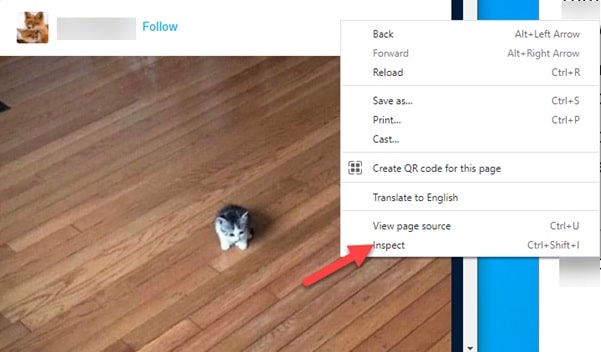
Step 2: For the search box press Ctrl+F from your keyboard and enter video/MP4 in the search box and hit the Enter key.
You will get the Tumblr video link in the highlighted area with https.
Then open a new Chrome tab and you will have to copy and paste the link here.
Right-click on some blank space and choose the Save video as an option from the menu.
After that rename the video and choose a proper location to save. Hit the save button to commence the process.
Process 2: Downloading Video By Firefox
This is another possible way to download Tumblr videos. For keepsakes, you may save your favorite videos or share those with friends who are not using Tumblr.
You can watch those any time you wish. Now let us check how to do that with the Firefox browser.
Follow the steps mentioned below:
Step 1: First of all, select the video from Tumblr that you wish to download.
Step 2: Now right-click on the page and click on Save Page as an option. Now select Web Page complete from the given option.
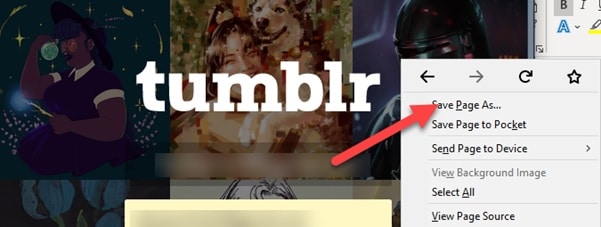
Step 3: The webpage will be saved to your desired location as an HTLM file and folder. It will have the contents under the name that you have given while saving.
Step 4: Now go for opening the folder and when you will find a file – a_data, choose to open it.
You will get a video file saved in MP4 format.
Process 3: Tumblr Videos For Android Devices
Now I am going to show you how to download Tumblr videos for your android devices.
Here Is a comprehensive guide for explaining the process in detail:
Step 1: For your Android devices you may take the help of Video Downloader for Tumblr. From the app store, download and install this software.
Step 2: Now open Tumblr app and select the video you wish to download.
Step 3: Choose the share option and click on it.
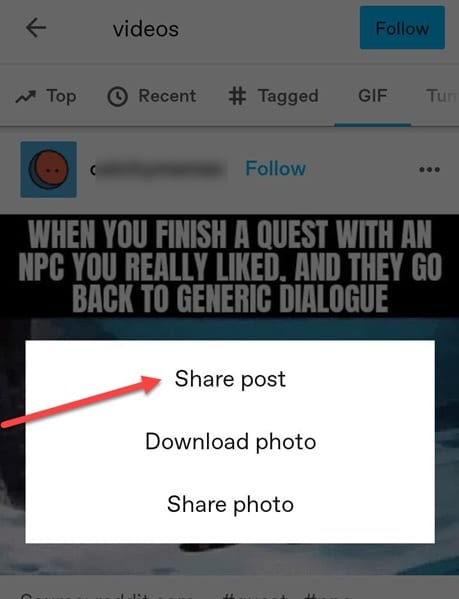
Choose to share the video with Video Downloader for the Tumblr option.
Step 4: Your request will get automatically processed in seconds. After the process gets completed save the video and chooses the Download Video option. Your video will get downloaded now.
Process 4: Downloading Tumblr Video Online
For expressing and sharing each other’s thoughts, people choose Tumblr.
There are many GIFs, short videos, pranks shared through Tumblr, and when you are looking forward to ripping video from Tumblr, check how to save the video online.
Step 1: Get the link to your Tumblr video as I have mentioned above.
Step 2: Now open your web browser and visit the online site and paste the URL there.
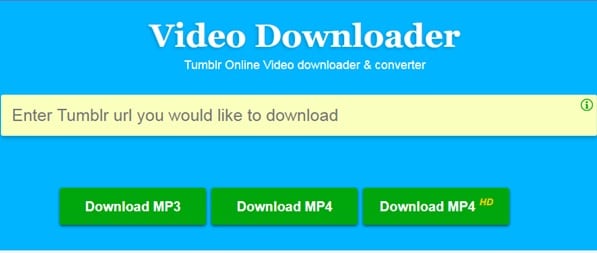
Step 3: Select the format – MP3 or MP4 and hit the download option.
Winding Up
So, I hope by now, you could find out how to download Tumblr videos from the given article.
If you still have queries related to this issue, please communicate with us in the comments section provided below.
Feel free to shoot us a mail with your ideas or suggestions. We always look forward to hearing back from you.

