Windows 10 was made with regular security updates in mind. It is for this reason that you see regular patch updates, and there is also no proper way to stop those updates. This ensures that your device receives regular updates and is protected against malicious software and vulnerabilities.
Microsoft also launched an Upgrade Assistant that helps scan for these feature updates and delivers them to your system. You can download the Upgrade Assistant from the link here.
What Is The Windows10Upgrade Folder?
When you install the Windows Upgrade assistant, the installation data and files are stored in the Windows10Upgrade folder.
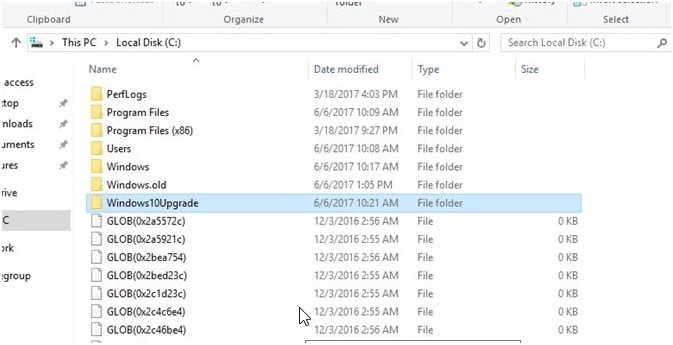
Windows update files are downloaded as ESD files from their servers. These files and other important files required for the upgrade are stored in this folder. The upgrade assistant uses these files in the Windows10Upgrade folder to keep your device up to date.
Is It Safe To Delete Windows10Upgrade Folder?
If you are bothered by the folder as well, you might want to know if it is safe to remove it.
If the upgrade process went perfectly, it is absolutely safe to remove the folder. The folder comes bundled with the Upgrade Assistant and you need to remove the Upgrade Assistant in order to remove the folder.
How To Remove Windows10Upgrade Folder?
If you want to know how to remove the Windows10Upgrade folder, here I will discuss how to do so.
- Open a run dialog by pressing Win + R.
- Type appwiz.cpl and press Enter to open Programs & Features in control panel.
- Here locate and click on Windows 10 Upgrade Assistant.
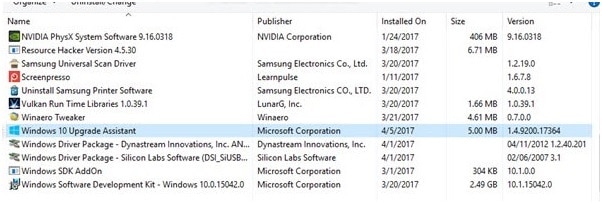
4. Click on Uninstall and follow the onscreen instructions to uninstall the application.
If the uninstallation completes normally, the Windows10Upgrade folder should be deleted from the Operating system folder.
Conclusion
The program files required to run the Upgrade Assistant are stored in the Windows10Upgrade folder. Now you know how to delete the Windows10Upgrade folder from your system using the steps given above. Did you find this useful? Comment below if you did and to discuss further the same.
