General discussion platforms like Yahoo Answers and Quora are a really fun place to get information about all sorts of things. You will find and can ask all sorts of questions, from serious discussions to non-sensical banter. However, getting carried away while asking questions is common, and you may be wondering ‘How can I delete questions from Yahoo Answers?’
Well, here is the appropriate method to edit and delete yahoo answers questions.
How Can I Delete Questions From Yahoo Answers?
You can edit and delete your questions very easily if you log into your Yahoo account. Follow these steps for deleting your Yahoo answers questions:
Note: Yahoo Answers will not allow you to delete a question that you have marked as “Select Best Answer”. You cannot make changes or delete your content after your question is resolved.
Step 1: First you need to log into your Yahoo account. Use your correct credentials to log into your account.
Step 2: When you log into your account, you will be presented with the home page of Yahoo Answers.
Here, click on the Questions section. You will see all the questions you have asked on Yahoo Answers.
Step 3: Click on the question that you want to edit or delete. This will open the question title.
Step 4: Click on the pencil button next to Edit. This will open a context menu with additional options.
Step 5: In the additional menus, click on Delete question.
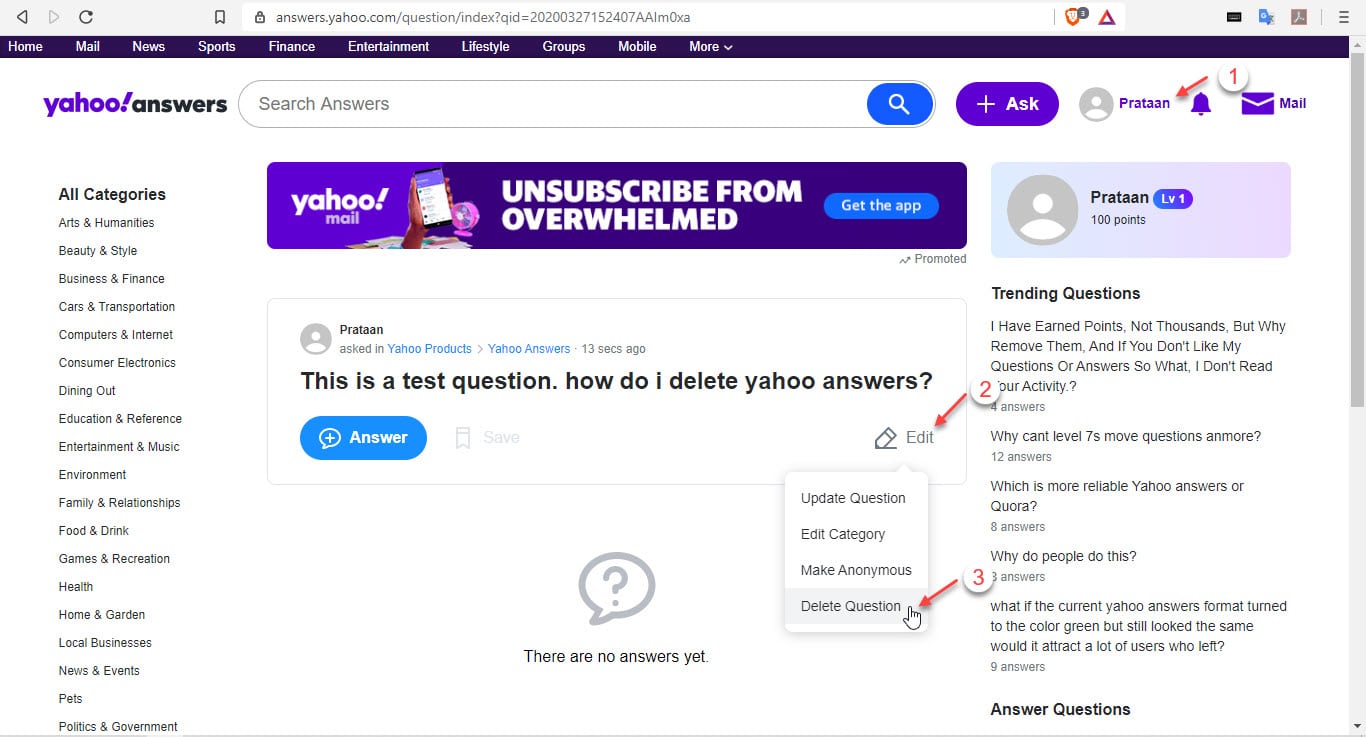
Step 6: In the confirmation dialog, click on the Delete button to delete the question.
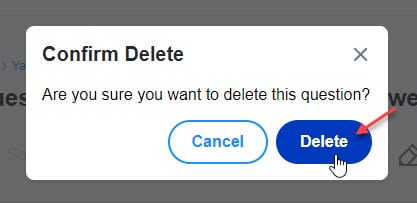
This will delete the question from your list of asked topics.
Conclusion
So there you have it. If you were wondering ‘How can I delete questions from Yahoo Answers?’, now you know how to, using the method provided above. What are your favorite threads in Yahoo? Tell us in the comments below.

