With onboard storage becoming smaller in quantity, users have to be careful about what they store on their device. If not, you will find that your device fills up in no time, leaving you with no space on your disk to store additional files. Browser cache is the archnemesis to the storage, as they have been notorious culprits of filling up your storage space.
Here, I shall discuss what is hosted app data, and how to remove it from Google Chrome.
What Is A Hosted App?
As the name suggests, the entire contents of a hosted app are stored on a hosted space. A hosted app is a complete web app that has its app resources (HTML, CSS and JS codes, app manifests, etc.) all stored on a hosted web server. The app functions similar to a traditional web page, and the app manifest (stored in the app’s root directory) contains the descriptions and the icons among other data required by the application.
Many web apps use this model as a way of keeping control over the application files, which may be necessary for certain situations. However, when these apps face any issues, you will need to clear the hosted app data from your Google account.
How To Clear Google Chrome App Data And Hosted App Data?
While we have previously covered how to clear Google Chrome browsing data, the option to clear hosted app data is in the advanced section of the dialog box. This is after a recent change in the Clear Browsing Data dialog box appearance, among other changes.
The Clear browsing data dialog is separated into two different tabs now, the Basic and Advanced tabs. These tabs differ in the way of what you can clean using the two tabs.
The Basic tab allows you to delete the browsing history, cookies, site data, images, and files cache from a time range of your choosing. To gain access to all the options, you will need to switch to the advanced tab. here you will find the other options such as download history, passwords, site settings, hosted app data, and media licenses among other things.
To clear Google Chrome app data, You can choose any of the two methods below, both of which are very quick when you want to delete Chrome app data.
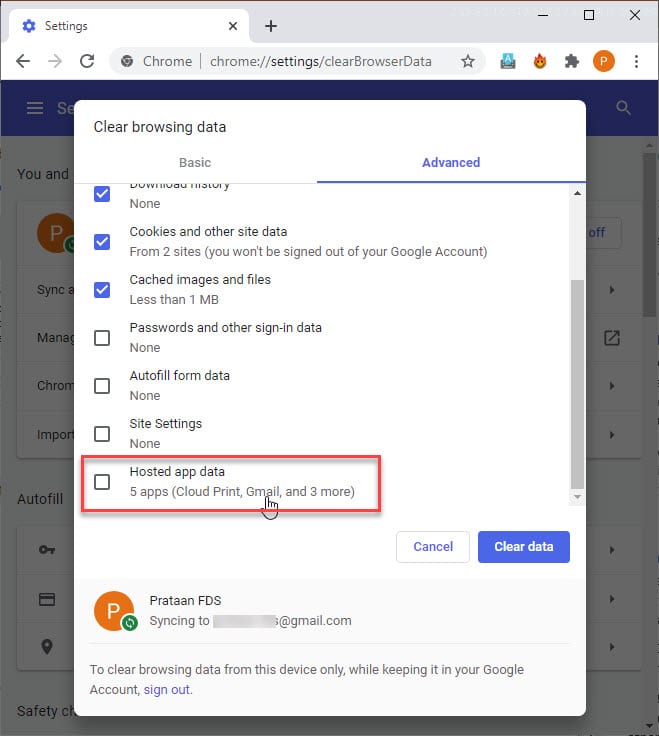
Method 1: Directly Load Clear Data Address
One of the quickest methods to clear Google Chrome app data involves directly entering the address to the clear browsing data dialogue box. Follow these steps for the same:
- Press Ctrl + L to directly jump to the address bar of Google Chrome.
- Enter the following address and press Enter to directly launch the Clear browsing data dialogue box:
chrome://settings/clearBrowserData
This will directly load up the clear history dialog box.
Method 2: Chrome Delete History Shortcut
In a new browser tab, simply use the keyboard shortcut Ctrl + Shift + Delete to open the Clear browsing data dialog box. This keyboard shortcut also works on many other browsers like Mozilla Firefox and Microsoft Edge.
How Long Does It Take To Clear Cache?
With the increasing speed of computing technologies, clearing browser history is an almost instantaneous process. However, on some older devices, clearing your hosted app data can take up to 5 minutes.
Check out this post if you cannot clear Google Chrome history.
Wrapping Up
So there you have it. Now you know what hosted app data is, and how you can clear it using the built-in dialog box. Comment below if you found this useful, and to discuss further the same.

